// gpg: the ungovernable key
Cryptography as a concept is one thing. Understanding why it matters, how the mathematics work, what makes a key a key, that’s the foundation, and I covered it in Cryptography: The Weapon They Couldn’t Ban. But theory only gets you to the door. What’s on the other side is a terminal, a handful of CLI commands, and the particular satisfaction of holding something the system cannot touch. This guide is how I actually use GPG. My setup, my choices, my keys.
GPG Architecture#
GPG is where that theory becomes practice. And the first thing to understand is that a GPG key is not a single key. It is a keyring, a master key with attached subkeys, each with a specific capability. Think of it like the Keymaker in The Matrix: the master holds the architecture, but the subkeys are what actually open doors.
The capabilities are:
[C] Certify. Sign and revoke subkeys, sign other people’s keys, issue revocation. Master key only. Air gapped, never touches a networked machine.
[S] Sign. Git commits, code signing, document signing.
[E] Encrypt. File and email encryption, password manager backups.
[A] Authenticate. SSH, VPN, hardware token (YubiKey).
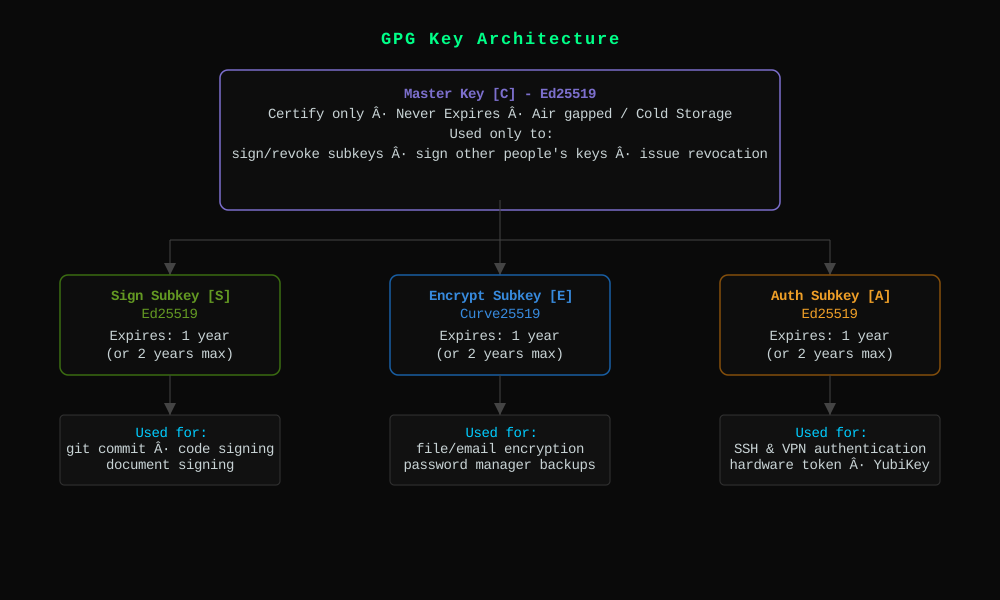
The master key holds [C]. It is your cryptographic identity, your root of trust. The subkeys do the daily work.
This separation is the heart of good GPG hygiene. The master key proves you are you. The subkeys can be replaced without changing your identity.
Two Threat Models#
Not everyone needs the same setup. Before touching a terminal, decide which model fits your situation.
Model One. The Full Architecture. High Stakes.#
Who this is for: software maintainers, journalists, activists, anyone whose key compromise would be genuinely damaging. Anyone who wants maximum long-term security.
The master key lives offline, on an encrypted volume. Subkeys live on a hardware security key. Your daily machine holds nothing but pointers.
What this buys you: if your laptop is seized or compromised, the attacker gets subkey stubs that only work with the physical hardware key. If the hardware key is stolen, you revoke those subkeys from your offline master and issue new ones. Your identity survives both scenarios.
The cost is complexity. You need the hardware key present for every crypto operation. You need the encrypted volume when managing keys. Setup takes an hour done properly.
Model Two. The Simple Setup. Lower Stakes.#
Who this is for: writers, bloggers, people who want to publish a verifiable identity, anyone who wants encrypted email without managing hardware.
One key, generated and stored in ~/.gnupg. Set an expiry date. Back up the secret key to an encrypted location. Publish the public key.
What this buys you: a verifiable cryptographic identity with reasonable security. Encrypted email. Signed content. Good enough for most people.
The tradeoff: if your machine is compromised, so is the key. Which is why expiry and renewal matter. A compromised key has a natural death date.
Deployment#
Model One. Offline Master with Hardware Subkeys.#
Requirements: GPG, an encrypted volume (VeraCrypt or LUKS), a YubiKey 5 series or equivalent.
Step 1. Prepare the Environment.#
Mount your encrypted volume and set GPG to work from it:
| |
This keeps your entire keyring on the encrypted volume. Unset it when done.
Step 2. Generate the Master Key (Certify Only).#
| |
Use a real email address you control and can receive mail on. If you intend to publish your key to a keyserver like keys.openpgp.org, email verification is required. The address becomes part of your public identity on the PKI.
The Key-Usage: cert line forces a certify-only master. GPG will not add Sign capability automatically. Verify with:
| |
Look for cC in the capabilities field. Certify only. Correct.
Step 3. Add Subkeys.#
| |
Add each subkey with addkey:
- Sign: type
10(ECC sign only), Curve 25519, expiry1y - Encrypt: type
12(ECC encrypt only), Curve 25519, expiry1y - Authenticate: type
11(set own capabilities), toggle to Auth only, Curve 25519, expiry1y
Save with save.
Step 4. Back Up Everything.#
| |
The revocation certificate was auto-generated. Verify it exists in $GNUPGHOME/openpgp-revocs.d/. Keep all of this on the encrypted volume.
Step 5. Configure the YubiKey.#
Change the OpenPGP PIN and Admin PIN from factory defaults:
| |
Change the key slot attributes to Ed25519/Curve25519 before loading:
| |
Choose ECC, Curve 25519 for each slot.
Step 6. Move Subkeys to Hardware.#
| |
keytocard is destructive. It moves, not copies. Your backup on the encrypted volume is the only other copy. Confirm the state:
| |
You should see sec for the master and ssb> for subkeys on card, with card-no matching your hardware key serial.
Enable touch policy. Require a physical tap for every crypto operation:
| |
Step 7. Import Subkey Stubs to Daily Machine.#
On your daily machine, not the encrypted volume machine:
| |
Plug in the hardware key and verify the stubs link up. Your ~/.gnupg now holds pointers only. No private material.

The recovery logic is where the architecture proves itself.
YubiKey lost or stolen: revoke the subkeys from the master, generate new ones, load onto new hardware. Your identity is intact. VeraCrypt volume lost: daily operations continue, but you cannot issue new subkeys or revoke properly when they expire. This is why two VeraCrypt copies matter. Both lost: publish the revocation certificate. Start fresh.
Model Two. Simple Single Key.#
Step 1. Generate.#
| |
Choose 9 (ECC and ECC), Curve 25519, expiry 2y. Enter your name and email.
Step 2. Back Up.#
| |
Store the secret backup somewhere encrypted. A VeraCrypt volume, an encrypted USB, a password manager’s secure notes. Not in your cloud.
Step 3. Publish.#
| |
Verify via the email link you receive. Then publish pubkey.asc wherever makes sense: your website, your about page, your git profile.
Publishing Your Public Key#
This applies to both models. Your public key should be easy to find.
Serve gpg.asc from your domain:
https://yourdomain.com/gpg.asc
Add a <link> tag in your HTML <head>:
| |
List your fingerprint visibly on your contact or about page. Upload to keys.openpgp.org and verify your email.
Display fingerprints in groups of four for readability:
2413 E30B 73E9 7597 FEC8 88DF 583C 4903 CCED B6A4
Ongoing Maintenance#
Renewing expiry. Before subkeys expire, mount your encrypted volume, set GNUPGHOME, and extend:
| |
Then re-export and re-publish your public key. The expiry change is part of the public key data.
Revoking a subkey. If a subkey is compromised:
| |
Re-publish the public key. The revoked subkey will now show as invalid.
Revoking the master. If the master is compromised, import and publish the revocation certificate:
| |
A Note on Prerequisites#
This guide assumes comfort with a terminal. All commands are Linux-native. Model One in particular requires it, there is no way around the CLI for offline key management and YubiKey configuration. Model Two is more forgiving. If you are on Windows or macOS and prefer a graphical interface, Kleopatra implements the same operations with a GUI and is a reasonable starting point before graduating to the terminal.
The Philosophy#
Surveillance is not an accident. It is the default state of networked infrastructure built without privacy as a design goal. Cryptography does not fix this, but it raises the cost and effort. It makes mass surveillance expensive and targeted surveillance visible.
GPG is not convenient. Convenience is what surveillance relies on. Every time you sign a release, encrypt a message, or verify a fingerprint out-of-band, you are participating in an older, slower, more deliberate form of trust. One that does not require a corporation in the middle.
The key you control is the key they cannot subpoena.